
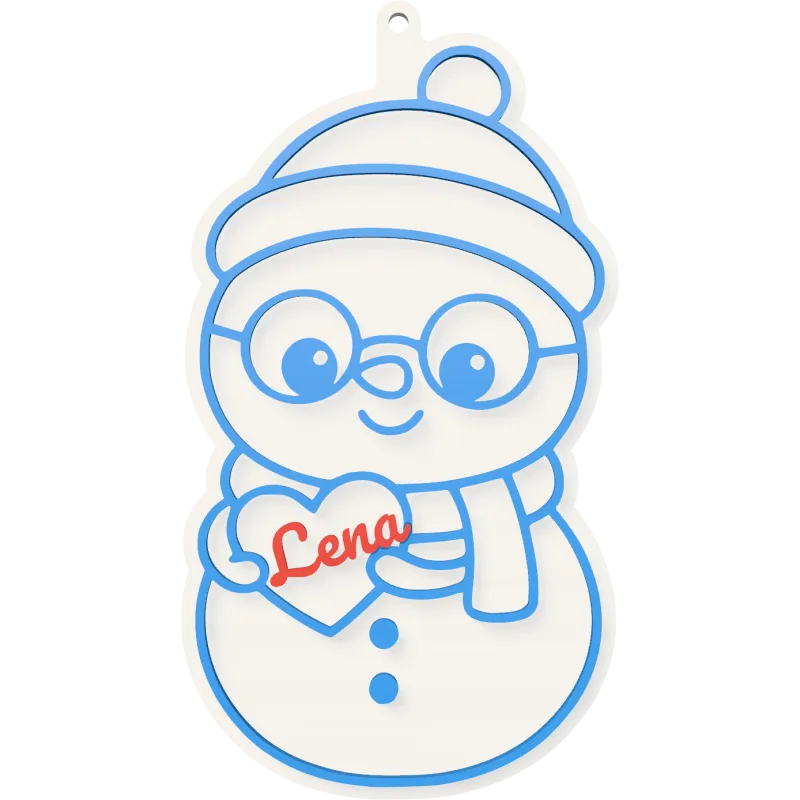


The 3D view isn’t available right now. Here is the top view.
The app was updated. Reloading the page…
Its files couldn’t be loaded. Reload the page; if that doesn’t help, check your connection.
Your browser can’t start WebGL right now. The 3D view comes back by itself once it can; if it doesn’t, restart the browser (Chrome switches WebGL off after a graphics crash) and check that hardware acceleration is on.
Your browser can’t start WebGL right now. Restarting the browser usually helps (Chrome switches WebGL off after a graphics crash); also check that hardware acceleration is turned on.
It stopped with an error. Try again; if it keeps happening, reload the page.
Details
The cutting plan appears once the preview is ready.
The cutting plan can’t be built right now. The 3D view still shows your design.
Cut Score No score lines Engrave Gluing guide
About this laser cut file
The name is fitted into the heart by itself and always stays inside it.
Cut it layered, with the line work and the name glued onto a back plate that follows the snowman with an even border, or as one piece: the lines cut out like a stencil with the name cut through the heart, or engraved into it. Hang it from a hole on the hat, stand it in its base plate, or keep it plain.
How it works
-
Type the name for the heart.
-
Choose Layered, with the line work and the name glued on, or One piece, cut out or engraved. Pick the font.
-
Set the size: any height from 2.36 to 23.62 in. The name grows with the snowman; the hanging hole, the stand’s tabs and the bridges keep their real size.
-
The name fits itself into the heart. Under Mount, choose a hole to hang it, the stand, or neither.
-
Download the SVG and cut it. Layered, glue the line work, the mouth, the buttons and the name onto the back plate. With the stand, plug the tabs into the base plate.
What’s in the file
- Cut lines: layered, the back plate, the line work with the mouth and the buttons, and the name; one piece, the snowman with its lines cut out and the name cut through the heart.
- One piece engraved: the lines cut out the same way, and the name as engraving, filled or as outlines, as lines or as an image for raster engraving.
- Score lines (optional): where a letter lies on the letter before it, its edge is scored, so every letter reads on its own.
- Mount: a hole on the hat, or the base plate with slots cut to your sheet thickness.
- Gluing guide (optional, layered): the line work and the name’s place on the back plate.
- SVG for every laser: the cut lines red, the score lines and the engraving blue, the gluing guide green, each on a layer of its own, true to size.
- PNG for raster engraving: the engraving alone - the score lines, the engraved areas and the gluing guide black on transparent at 600 dpi, as large as the sheet, so imported true to size it lies exactly on the SVG’s cut lines.
- PDF to print and proof: the same lines as vectors, true to size, every kind of line on a layer of its own - printed at 100 %, it shows the real size.
- AI for Illustrator: the same file as the PDF, which Illustrator opens as its own document, every kind of line on a layer of its own.
- DXF for CAD programs and RDWorks: the lines on the layers CUT, SCORE, ENGRAVE and GUIDE, in mm.
- STL to 3D print the design: the pieces as solids at their thickness - with several parts a ZIP with the whole piece and one STL per part.
- With Batch, several names at once: a ZIP with one file per name, or one sheet with all of them.
Questions
How big is the snowman?
By default it is about 3.94 by 7.09 in. Under “Size” you can set any height from 2.36 to 23.62 in. The name and the border of the back plate grow with the snowman; the hanging hole, the tabs and slots of the stand and the bridges keep their real size. On a small snowman the thin lines are cut a little wider so they hold, and small letters get a note.
Layered or one piece: how are the two snowmen made?
Layered cuts a back plate that follows the snowman with an even border, and on top of it the line work as one piece, the mouth and the buttons as small pieces of their own and the name inside the heart, so you can glue them in two colors. One piece is cut from one sheet: the spaces between the lines are cut away like a stencil, small bridges hold the mouth and the buttons, and the heart closes behind the name, which is cut through it. Or choose Engraved: the lines are cut out the same way, and the name is engraved into the heart, filled or as outlines.
Where does the name go?
Into the heart, as large as fits. It always stays inside the heart.
Can it hang or stand?
Both, one at a time. Under Mount, choose Hole for a round tab with a hole for a ribbon on top of the hat, above the balance point, so it hangs straight. Choose Stand and the bottom is cut straight with two tabs that plug into a base plate; set your sheet thickness, the tabs and the fit. Or choose None for a plain snowman.
Can I make one for every name on a list?
Yes. Choose “Batch” above the first text and paste your list, one piece per line, up to 100. Every line becomes its own piece: download a ZIP with one file each, or one sheet with all of them.


